Trading Method

Futures Trading

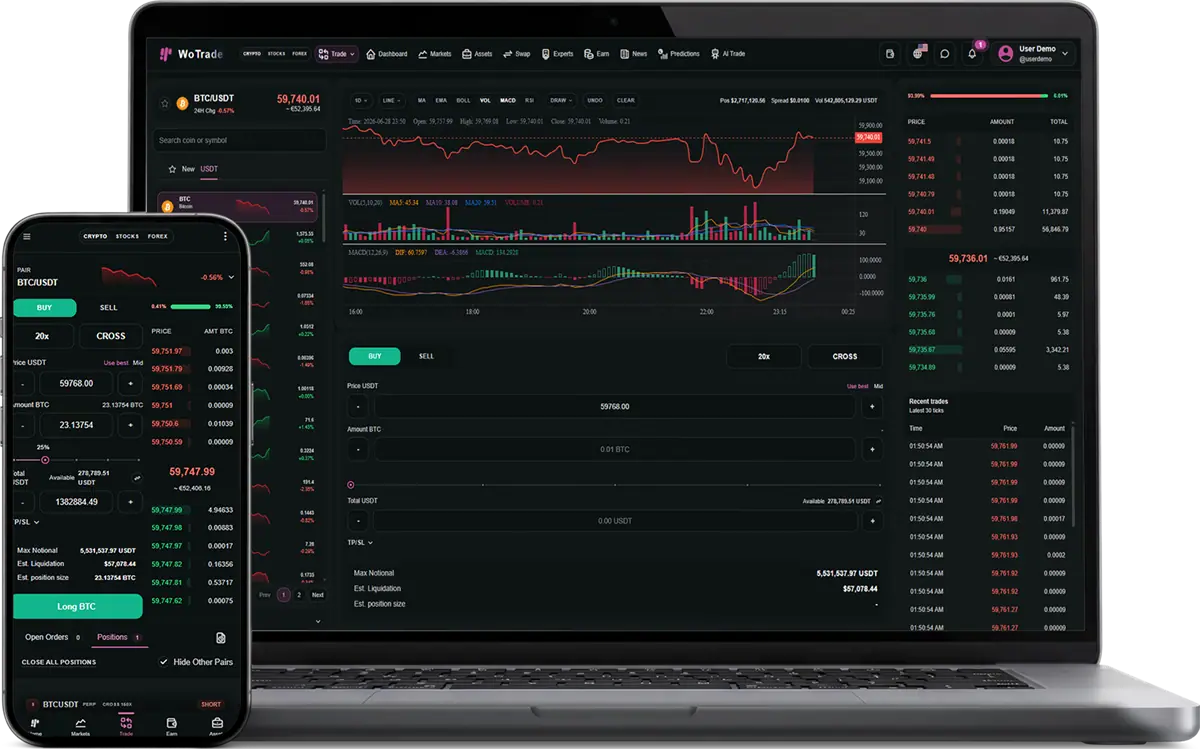
Adds crypto futures screens, order flow, and position management.
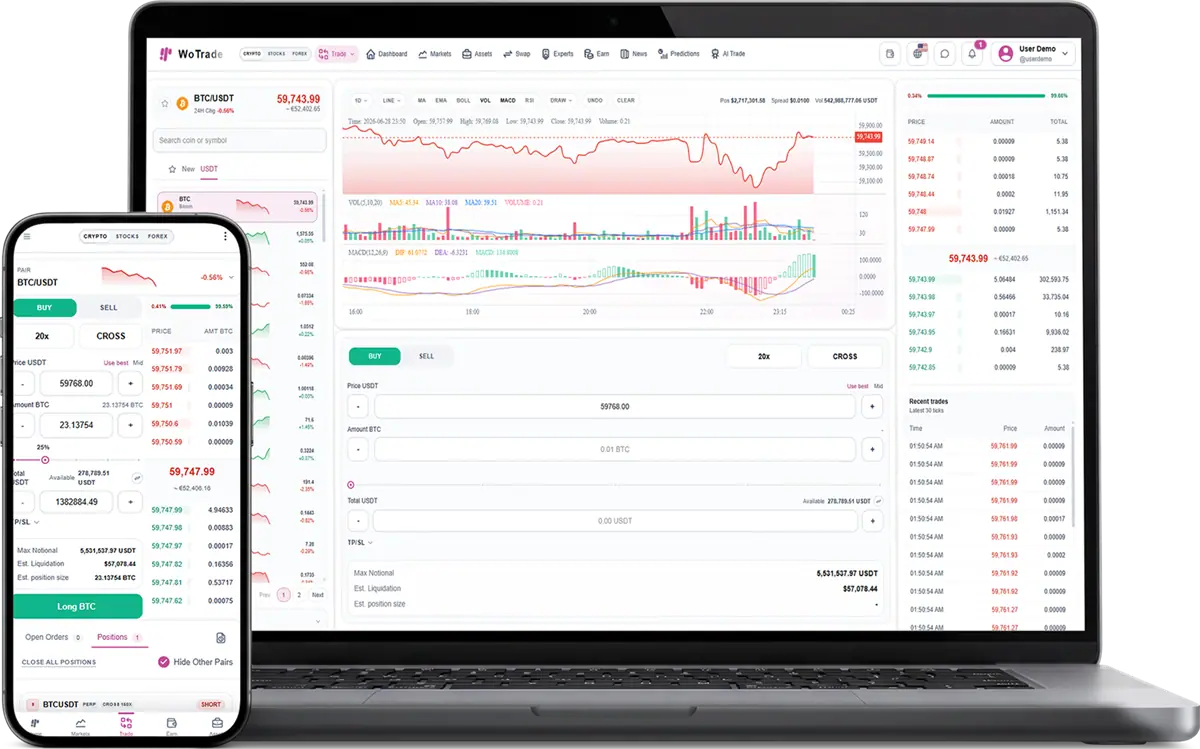
Futures Trading screenshot in light mode

What this plugin does

Futures Trading provides a leveraged cryptocurrency terminal with order preparation, cross and isolated margin modes, leverage controls from 1x to 150x, estimated liquidation and notional values, position monitoring, position-level leverage adjustment, take-profit and stop-loss targets, trailing stops, and partial or full position closing.

Complete interface reference

Every screen, control, and action

This reference documents the visible controls and operational behavior included with Futures Trading. Exact market values and customer records change at runtime, while the controls and validation flow remain consistent.

Order leverage

Adjust leverage before placing a futures order.

  • Decrease leverage button
  • Current leverage value
  • Increase leverage button
  • Leverage slider from 1x to 150x
  • Quick presets at 1x, 30x, 60x, 90x, 120x, and 150x
  • Confirm leverage selection

Margin mode

Choose how margin risk is allocated.

  • Cross: share available margin across futures positions
  • Isolated: restrict margin and risk to the selected position
  • Confirm selected margin mode

Order TP/SL

Set optional automatic order targets.

  • Take-profit decrement, value, and increment controls
  • Stop-loss decrement, value, and increment controls
  • First valid TP or SL value becomes the auto-order trigger
  • Mark-price-aware validation

Order estimates

Review calculated exposure before confirming.

  • Maximum notional
  • Estimated liquidation price
  • Estimated position size
  • Margin requirement
  • Trading-fee effect

Positions table

Monitor and act on open futures positions.

  • Symbol and perpetual-contract badge
  • Long or short side
  • Position leverage
  • Unrealized PnL
  • Entry price
  • Mark price
  • Liquidation price
  • Risk percentage
  • Margin mode and margin amount
  • ROI
  • Leverage action
  • TP/SL action
  • Close action

Adjust position leverage

Change leverage for an existing live position.

  • Position symbol and live-position context
  • Decrease and increase leverage buttons
  • 1x–150x slider and quick presets
  • Updated liquidation and margin implications
  • Apply to Position button

Position TP/SL

Create full-position profit and loss targets.

  • TP/SL tab
  • Take Profit trigger
  • Stop Loss trigger
  • Last or Mark trigger source
  • Price decrement, input, and increment controls
  • PnL Target modes: PnL, ROI, and Offset
  • USDT target context
  • Full-position 100% application
  • Save Targets button

Trailing stop

Protect a full position with a callback-based trigger.

  • Trailing Stop tab
  • Callback Ratio percentage
  • Decrease and increase controls
  • Quick presets at 1%, 5%, and 10%
  • Full-position trailing-stop notice
  • Save Trailing Stop button

Close position

Close all or part of a futures position.

  • Market close type
  • Target close type where available
  • Current mark-price display
  • Close amount in base asset
  • Decrease and increase amount controls
  • 25%, 50%, 75%, and 100% quick amounts
  • Notional estimate
  • Estimated PnL and ROI
  • Close Position button

How the complete workflow operates

  1. 1

    Customer selects a crypto perpetual market and long or short direction.

  2. 2

    Customer chooses cross or isolated margin and sets leverage.

  3. 3

    Amount, margin, fees, notional, liquidation, and optional TP/SL are reviewed.

  4. 4

    Order confirmation creates an open futures position.

  5. 5

    The live position tracks entry, mark, liquidation, risk, PnL, margin, and ROI.

  6. 6

    Customer can adjust leverage, save TP/SL or trailing-stop targets, or close 25–100% of the position.

  7. 7

    Closing realizes the calculated result and updates the futures wallet and records.

Validation and business logic

Leverage is constrained to the supported 1x–150x range.
Higher leverage increases position exposure and moves liquidation closer to the mark price.
Cross margin shares margin across futures positions; isolated margin confines risk to one position.
For a long position, take profit must be above mark price and stop loss below it.
For a short position, take profit must be below mark price and stop loss above it.
Invalid TP/SL relationships display an error and are not saved.
Position TP/SL and trailing stop apply to the full position in this build.
Partial closing recalculates close amount, notional, and estimated PnL from the selected percentage.
Mark price is used for displayed unrealized PnL, liquidation context, and configured trigger behavior.

Risk and operational notices

Higher leverage can liquidate a position quickly after a small adverse price move.
Margin and trading fees affect final PnL on every trade.
Lower leverage and a defined stop loss reduce—but do not remove—market and liquidation risk.
Displayed liquidation, notional, and PnL figures are estimates until an action executes.

Included capabilities

Futures trading terminal for crypto assets.
Order and position management surfaces.
Works with crypto market pages and asset detail flows.
License-gated access for paid client packages.

Good fit for

Sell an advanced trading package.
Offer futures separately from spot trading.
Create higher-value client bundles with multiple trading methods.

Delivered surfaces

A dedicated trading terminal or trading-method screen.
Order, position, contract, or execution-style UI depending on the plugin.
Integration with the required market plugin and user wallet surfaces.

Sales and package notes

This can be sold as a paid add-on and restricted to only clients who purchased it.
The client can see the plugin in WoTrade, but activation can be controlled from WoPixel purchase and subscriber data.
The plugin detail page can be used before checkout to explain why the client should add it.

Control points

WoPixel checkout records the selected plugin on the purchase.
WoPixel subscriber management can grant, revoke, or review access after payment.
WoTrade reads plugin state and purchase-code verification before exposing protected features.
Disabled or unlicensed paid plugins remain blocked even if a client tries to toggle them locally.

Client questions

Can I sell this plugin to only one specific client?

Yes. The plugin can be attached to one purchase, one client account, and one handoff flow instead of being enabled for every customer.

Can the client enable it without paying?

No. Paid plugins are designed to require purchase verification before they stay enabled in WoTrade.

Does this plugin operate the client business for them?

No. It provides software screens and workflows. The client remains responsible for legal compliance, marketing claims, users, and business operations.

Admin notes

Paid plugin that requires purchase verification.
Requires Crypto Market.
FAQ

Plugin questions

Common questions about adding, licensing, and using this plugin.

01 How do I get started?

Choose the product or service that fits your needs, create an account, and follow the checkout or onboarding steps.

02 Can I contact support before purchasing?

Yes. Contact support with your requirements and questions before you place an order.

03 Where can I manage my purchases?

Sign in to your dashboard to manage purchases, services, downloads, and support requests.

04 Which payment methods are available?

Available payment methods are shown during checkout and may vary by product or location.

05 Will I receive confirmation after purchasing?

Yes. You will receive an order confirmation and can review the purchase from your account dashboard.

06 How quickly will I receive access?

Access is normally provided after payment is confirmed. Products requiring setup may include an additional delivery timeline.

07 Can I ask for help after purchasing?

Yes. Use the support area in your account to contact the team about your purchase or service.

08 Where can I find product-specific details?

Each product page explains its included features, pricing, delivery method, and any specific requirements.